Showing posts with label Information Discovery. Show all posts

Sunday, August 26, 2012

and the winner is...

A big thank you to everyone who participated in the data viz challenge earlier this month (and thanks for your patience in awaiting this recap). As you may recall, the challenge was to help a philanthropic organization communicate a bunch of data about their various affiliates. If you're interested in a refresher on the details, you can find the challenge post with the full description here.

In this post, in addition to announcing the winner, I'll show a quick recap and my reactions to each of the submissions.

Submission 1: Peter Osbourne
You can view Peter's full description of his thought process in the comments of the post linked above. His main point was that, depending on the story one wishes to tell, a summary metric like averages may do the trick. Below is a snapshot of his workbook (he added the columns after the yellow one; full workbook can be downloaded here). In his comments, he makes a great point about figuring out what the story is first and then determining what data you have that best supports it (vs. putting together data and then trying to form the story).


Submission 2: Jon Schwabish
Jon decided on an interactive Excel graphic (download available here), which allows you to toggle across the various affiliates to get relevant detail on each. I really like the simplicity of the visual design used here. Great use of preattentive attributes in the line graph to make the blue line stand out from the others.


Submission 3: Lubos Pribula
Lubos continued the interactive Excel dashboard trend (downloadable here). I like the use of color to visually tie the line graph to the tabular data below (though we should be careful about the red-green color combination, which can be difficult for those who are colorblind). I also like the embedded bar charts within the tables at the bottom, which allow you to quickly visually compare aggregate measures across the various affiliates.


Submission 4: Gautham
Gautham created a dashboard in Tableau (if you don't have Tableau, you can download Tableau Reader here; Gautham's dashboard can be downloaded here). This dashboard allows you to view a single affiliate at a time and see a visual of their total assets in bars and number of gifts and grants via lines. This is useful if you want to compare the number of gifts and grants, or get a sense of the over time trends for a specific affiliate.


Submission 5: Rupert Stechman
Rupert took an unconventional approach to his data viz and went old school with pen and paper (which I love!) and created a sort of heatmap showing net change in assets over time by affiliate. Here's what he came up with (his blog post is here):


AND THE WINNER IS... Submission 6: Jeff Shaffer
Jeff created both a Tableau dashboard (downloadable here) and an Excel dashboard (pictured below; downloadable here). He doesn't win because he submitted dashboards in multiple forms, but rather because his visual is the one the foundation said they could see themselves using.

Here's what the philanthropic organization said: Thank you so much for trying to help us get a visual for our data. Your readers are much more skilled than I, and did some really interesting things with the data. I think Jeff Shaffer came closest to getting us something like what we need. His dashboard approach would be really useful in some instances."


Personally, I would have had a hard time choosing a winner (one reason I'm happy the philanthropic group made the decision for me!) - there are components I like from each of the visuals and I think each could work well, depending on what story you want to tell and who the audience is. This is a great reminder how important those pieces are - it's really difficult to create the perfect visualization without a good understanding of what story we want to tell and who we want to tell it to. We should absolutely spend time up front establishing that (and coaching our colleagues and clients to do so) before we create the supporting visual.

9/4 UPDATE: Jeff graciously put together a "how to" for creating the dashboard above, which you can download here.

Cole's non-competing submission
And I of course couldn't help but build my own visualization of this data as well. I did not go the interactive dashboard route, because the description made it sound like it was important to understand the trends for a given affiliate while also being able to compare those to other affiliates (hard to do in a dashboard that focuses on one affiliate at a time, though a couple of the above submissions address this in different ways). Here's a snapshot of what I came up with (I just show 4 here, but this approach continues for each of the affiliates; the Excel file is downloadable here):


Thanks, all, for playing (and Jeff, my offer stands to have you write a guest blog post if you're interested!). Let me know if you think I should pose challenges like this again in the future!

Thursday, July 5, 2012

we are what we eat

As those who know me are aware, some of my biggest passions arise in the realms of data visualization and food. Every so often, there is an intersection of the two seemingly unrelated subjects. I recently came across one example, a project called "The Eatery: A Massive Health Experiment".

Part of the project is an app: you take pictures of the food you eat, and it records data to show patterns about your eating habits back to you. There's an interesting crowd sourcing component, where in addition to rating how healthy the various dishes you're eating are, others (friends or strangers) can rate the healthiness of what you're eating as well. The concept is interesting: that by being more informed about what you are eating and how it fits together, you can be more aware of unhealthy patterns and change habits to improve health. Here's a video with more details:


The data collected isn't yours alone, but also contributes to a growing database, from which the folks behind the project are starting to pull observations and trends from analysis and visualization of the data: currently the data is over 7 million food ratings of half a million foods by Eatery users from over 50 countries over a span of 5 months. While I'm not a huge fan of the cartoony infographics, they do contain some interesting factoids, and I love the time-based visual on the relative healthiness with which people eat across geographies. I've put a screenshot of it below; you can view the interactive version of it as well as the infographics here.


Collecting individual data for better decision making seems to be an area of growing interest. Are you aware of other mechanisms for doing so? What data do you (or would you like to) collect about yourself? What do you do with it?

Wednesday, June 6, 2012

visualizing everyday life

The data visualization in my life is primarily in the business-world. At my day job: how do we ensure that people decisions at Google are data-driven? In my presentations and workshops: who is our audience, what do they need to know, and how do we craft a visual and story to do that?

But many take data visualization into the personal sphere as well: using visualization to better understand aspects of their world or their life. I encountered one such example recently, when a data viz course participant at Google shared an example he created:

"Hi all,  Here is silly little thing I cooked up over the weekend. My wife likes fresh tomatoes, of what are called heirloom varieties (not the big commercial ones) - 16 different ones each year in our garden. We used to have trouble selecting which ones to grow each time, for the last 4 years have kept pretty good records of them, so I wanted to see if there were any patterns.

This is my first such chart after taking the basic data viz class, where I had a chance to sit and think about how to make it look. I did violate the color palate guidelines a bit, to color code each tomato by type. But this makes the type of tomato stand out, as well as the pattern."

Neil goes on to say, "Interestingly enough, until I graphed it, I didn't know that we rarely have a yellow tomato invited back a second year. Our by year lists (stored on a wiki at home) tended to mask that information." I love the use of data viz for this sort of problem solving: what type of tomatoes should I plant this year? I think Neil's next challenge will be to identify and start recording and visualizing some success measures (e.g. plant yield, flavor) to really hone his future garden crops.

This reminded me of another food-related data viz I saw some time ago, where a woman had tracked everything she ate for a year, then created a number of visualizations based on the data. You can read about that and see the visuals in this Flowing Data post.

Food for thought (no pun intended!): what do you (or could you) visualize in your life?

Friday, November 18, 2011

visual battle: table vs graph

In a data visualization battle of table against graph, which will win?

The short answer (which may be less than satisfying) is: it depends. Mostly, it depends on who the audience is and how the data will be used. One important thing to know is that people interact very differently with these two types of visuals. Let's take a quick look at how and some use cases for each, then we'll look at a specific example from a recent WSJ article.

Tables, with their rows and columns of data, interact primarily with our verbal system. We read tables. When I have a table in front of me, I typically have my two index fingers out - I scan across rows, down columns, and I compare values. Tables are great when you have an audience who wants to do just that. Or if you have a diverse audience, where each wants to look at their own piece: a table can meet this need. Tables are also handy when you have many different units of measure, which can be difficult to pull off in an easy to read manner in a graph.

Graphs, on the other hand, interact with our visual system. It's a high bandwidth information flow from what our eyes see to the comprehension in our brain, which can be extremely powerful when done well. Graphs can present an immense amount of data quickly and in an easy-to-consume fashion; they are particularly useful when there is a point to be made in the shape of the data, or for showing how different things (variables) relate to each other.

Let's look at an example. There was an article posted recently in the Wall Street Journal online titled, "Young Workers Like Facebook, Apple, and Google" (article). With the article, came an "Interactive Graphic," a table listing the 150 companies included in the survey, relative rank, and the percentage of young worker respondents that voted for each. (Slight tangent: while I suppose the interactive label fits, I was a little surprised to find that the only way I could interact with the data was to sort each column in either ascending or descending order - I guess this would be useful if I were looking for a particular company, so I could alphabetize the list, but utility beyond that is limited.) Here's what the top of the table looked like:


Question: was it right of WSJ to include a table rather than a graph?

In this case, I think the answer is yes. The article spends time discussing Google in the top spot (making the article title seem somewhat incongruous to me...also interesting that they mention Google last out of the three companies called out in the title while it ranked first), but then also points out some other nuances, for example the decrease in financial sector rankings (though the year over year data is not provided to the user). My assumption is that they wanted to include all of the data so that users could look up specific companies of interest, or look at the top or bottom of the list. This hits the one of the table criteria that we described above: a diverse audience, each wanting to look up their own piece.

If, however, the primary goal is to make the point that Google is well ahead of the pack (which is the focus of the majority of the article), a graph would help us to visually tell the story more quickly and arguably more effectively than can be done with the table.

Question: what should we graph? Graphing all 150 companies is out of the question: there are too many and the tail will take up more space than the value seeing it will add. So we know we need to graph something less than all, but the question remains: where should we make the cutoff?

We can pick a clean number (this is likely the rationale behind the top 3 that WSJ mentions in title): top 5, top 10, top 20. But in doing so, we run the risk of including and excluding companies of very similar values (for example, if we were to graph the top 10, we'd include the CIA at 5.04% but exclude Nike, which is only 3 basis points lower, at 5.01%). This isn't to say this isn't acceptable, but to point out that it should be an explicit decision: you should understand the pros and cons of this approach and be accepting of the cons (vs. not recognizing that they exist).

Another option is to graph the data and then look for the natural breaks that occur and have our cutoff reflect this nuance in the data. Here's what it looks like if we graph the top 25 (quick & dirty):


Here, the y-axis is the % of respondents and the x-axis is company rank. I found it hard to see the difference in the length of bars plotting this direction, so also tried the horizontal bar chart:


I find it much easier to see the relative differences in this second iteration of the chart (somehwhat due to the compression of the bars, also it just seems easier to scan down vs. across to spot differences in bar length). Based on this, it looks like there are clear differences between 7th and 8th place, between 8th and 9th, between 11th and 12th, between 15th and 16th, and so on. We could make arguments for a number of different cutoffs. In this case, I'm going to decide to take the top 15, both because it's a clean number (I've always liked multiples of 5, not sure why) and because we see a drop between the 15th and 16th positions (it's also the point where we break the 4% mark: 4.04% respondents vs. 3.80%, which I can note in a footnote).  You could make an argument to make the cutoff in another place, but this is what I'm going to go with for the reasons that I've outlined.

So if I want a visual to highlight the point in the article that Google is ahead of the pack, here is what it could look like:


Main takeaway: when debating table vs. graph, ask yourself how the data will be used and consider your audience. Let the utility of the visual that is needed drive your decision.

Friday, July 15, 2011

interesting

I just came across this graphic over at Chart Porn. What story would you tell with this data?


Wednesday, July 13, 2011

visual.ly is live

A few months ago, I came across the visual.ly site, which at that point was a temporary landing page with a lot of sexy looking graphics where you could input your email to be notified when the full site launches. I received that notification this morning, and it's certainly creating a lot of buzz: I've had a number of friends and colleagues forward me the announcement and ask for a review. 

Visual.ly says it is the world's largest community for exploring, sharing, creating, and promoting data visualizations. I have mixed feelings so far based on the detail I've perused. It seems like describing the graphics there as "data visualizations" might be somewhat of a misnomer; perhaps "information graphics" would be a better description? A number of the visuals I've looked at contained no data at all (example).

One thing the images do seem to mostly have in common is their visual bling - they look exciting at first glance due in many cases to color and complexity. I worry about this, as sexy can be good for grabbing an audience's attention, but to maintain it, the visual needs to be clear and straightforward: I'm not sure all of the content there meets the mark on this latter piece. If it works as it appears is planned, this should self-correct over time, with popular visuals rising to the top and vice versa through the wisdom of crowds. I just hope the crowd is wise enough to value utility over sexy.

There are some stellar graphics there for sure. I've included a few of my most and least favorites from what I've looked at so far at the bottom of this post.

There seem to be some technical difficulties (I've had a lot of instances of pages timing out, visuals not loading, and buttons not following through on what they claim they will do for me), but expect that these are painpoints that the crew at visual.ly is actively working to fix.

I'm interested to see whether this site will take off. Take a look. Leave a comment with your thoughts!


cole's faves (based on what I've looked at so far):
view original

view original


going to give cole nightmares (notice a theme?):
view original
view original


view original


view original

Tuesday, July 12, 2011

I like this chart

David McCandless does some beautiful work (if you aren't familiar, check out his website here or TED Talk here). His latest post is on sunscreen and features a massive infographic titled The Suncream SmokeScreen.

As is the case with many infographics (and here, I use infographic in what I consider the true sense of the word - when many different aspects on a single topic are shown through multiple visualizations and compiled together to form a single master infographic), you have to have the desire to spend some time with it to really understand what's going on, because there's a lot going on. But that's kind of the point. What I like about it is that each segment within the infographic is really straightforward: it demonstrates good use of preattentive attributes (e.g. color, size) and is very clean - no clutter to distract from the data.

Here's a segment I particularly like:


Attention is drawn to the data through the preattentive attribute of color (my only gripe is that I wouldn't have gone with an orange/red color scheme, which is not so colorblind friendly, but I imagine this choice was made to be in keeping with the topic and reminiscent of the sun). There is no presence of unnecessary gridlines or tickmarks. The rest of the stuff (chart axes, labels, sources) is pushed to the background by making it grey. This simultaneous emphasis of the important stuff, elimination of the unnecessary, and de-emphasis of the other stuff that needs to be there but doesn't need to compete for attention really makes the data sing. And it sings beautifully.

Until you start to think about what you're looking at. Cancer is clearly the antithesis of beautiful. And the instances of it in Australia dwarf the US and UK. Capping the y-axes on the US and UK charts and allowing Australia's to continue upward is really clever and helps to emphasize just how much higher the melanoma incidence rates are in Australia.

Showing each trendline in its own graph prompts a different sort of data discovery than it would if all were shown on a single chart. I have to think this was a very explicit choice. Because we read left to right, top to bottom, placing all three lines on the same chart would mean you'd encounter the Australia line first. Instead, with the three broken out, our eye looks first at the US, then to the UK (hm... lower than the US, but overall less sunny so makes sense), then to (holy sh**!) Australia, where the trend is not only much higher, but also following a steeper trajectory than observed in the other locations.

This visual tells a clear story because of all of these explicit choices made on the part of the designer. This information is beautiful (even if the underlying story is not).

Interested in the full infographic? You can find it here.

Thursday, July 7, 2011

how we use the mobile web

One of the perks of writing this blog is that friends and colleagues send me all sorts of examples of data visualization that they come across in their daily lives. This is helping me to amass quite the collection of good and not-so-good infographics.

A recent forwarded email from a friend had examples that fall into both of these categories. The email highlighted 10 recent infographics on the topic of how people use the mobile web. I've included my favorite and least favorite (aka favorite example of what not to do) below.

Thanks, Danny, for sharing!


Favorite
Why I like it: it's clean and easy to read. I think the use of pics vs. words to label the chart axes is clever (and manages to be straightforward without being obnoxious). It allows for some interesting info discovery, for example, high tablet use while watching television.

I would like a little more information on exactly what data is being depicted, though. Is it the percent who say they ever access the web on the given device in the given location/occasion, or do so with some specific level of frequency?


Least favorite
Why I think it's bad in a nutshell:
  • It's glitzy and includes a lot of noise that distracts and doesn't add informative value: background figures, shadowing, bizarre shapes and fonts. The Christmas color scheme, in addition to being obnoxious, is not color-blind-friendly.
  • The data visuals are hard to read (visual comparisons between the number of little phones or - even better - little phones with little bows on them - are not straightforward for our eyes, which have a hard time attributing quantitative value to 2D space).

Sunday, July 3, 2011

food & data viz

As those who know me are aware, in addition to opining on visual representations of information, I also cook (and blog about cooking at cole's kitch). I've joked in the past that those sharing the intersection of my personal passions - data visualization and cooking - are likely few in number. But every so often, I am reminded that there are some of them out there. The following is a snapshot of some cool things in this space I've come across recently.


Two years of food consumption...visualized
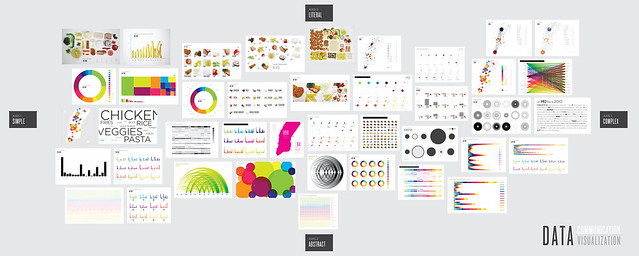
As part of her PhD thesis, Lauren Manning documented everything she ate over the course of a two year period. She turned this dataset into 40 visual representations of her food consumption. Crazy, or cool? I vote supercool. In the matrix below, the various visuals are arranged along an x-axis that ranges from straightforward (left) to complex (right) and a y-axis that ranges from literal (top) to abstract (bottom).


One thing I'm unsure of is the order in which the food groups appear in the various visuals. It's consistent across most of the visuals, which is helpful, but there isn't a clear meaningful order. If there isn't an intrinsic order in categories, how they are ordered should be an explicit decision on the part of the designer, as it has important implications on what stands out and what gets compared within the visual. The easiest comparisons are those next to each other. So if we were to group all of the starches, for example, it would become immediately clear that the majority were consumed in the form of pasta. Or you could order the categories by food consumption (from greatest to least or vice versa), which would better highlight the relative differences between neighboring categories.

One visualization that I didn't see in Lauren's set that I would be tempted to try with this data: spider graphs.


Our dwindling food supply
National Geographic Magazine recently published an interesting visual showing the relative varieties of different fruit and vegetables a century ago vs. today. In the visual, the width represents the number of varieties of the given food. Above ground are the varieties that existed in 1903; below ground is 1983.

The conclusion is a sad one: 93% of the varieties that existed in 1903 have gone extinct.

View original.


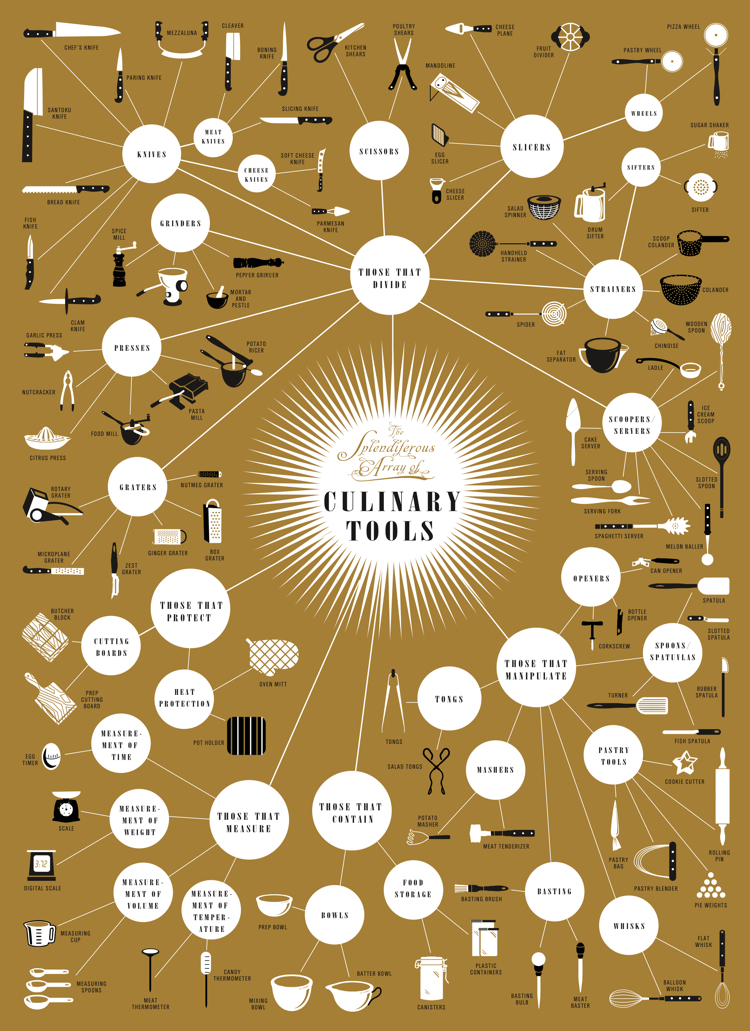
A complete guide to kitchen tools
The following poster by Brooklyn-based Pop Chart Lab arranges kitchen apparati into a massive flow chart. The tools are divided into categories according to function (e.g. those that divide, those that protect).

I find the "meat manipulation" category a little frightening (looks like a bad mob-murder-tool-kit). But happy to see it's neighboring category, "tongs", which I've been told are perhaps the most important tool in any kitchen.

View original.


If you happen to come across other interesting food related data visualizations, be sure to send them my way!

Saturday, May 28, 2011

information discovery: education & income by religion

A couple of weeks ago, the New York Times ran an article, Is Your Religion Your Financial Destiny?, which included the following infographic.


As my friend, Dave, who shared the article with me, pointed out - the color isn't necessarily informative, but it is an interesting way of carrying the gridlines across the page and certainly makes the visual eye-catching. I find the data it shows so very interesting.

Across the y-axis on the left, we see the percent of population with household income above $75K. The x-axis across the top shows percent that graduate from college. The dots plotted on the graph denote the various religions. You can quickly see that in general the higher the percent graduating from college, the higher the percent of >$75K income, which makes sense - one would expect positive correlation between education and income.

As my eyes scroll over the graphic, taking in the information, a couple of things make an impression. First, the wide spread: less than 10% of Jehovah Witnesses graduate from college (many don't finish high school, according to my mother's empirical evidence from the small sample she knows from her neighborhood) and their incomes reflect this. On the other end of the spectrum, over 70% of Hindus have a college degree. Also interesting: the places where the dots across the page do not follow a monotonically increasing line. For example, a greater proportion of Buddhists graduate college than Presbyterians, however a smaller proportion of Buddhist households have income over $75K compared to Presbyterians. The same phenomenon exists between Reformed Jews and Hindus. The Times refers to these anomalies as "less affluent than they are educated" and points to cultural influences and possibly discrimination as the root cause.

This isn't a case where the infographic is meant to highlight a single takeaway or recommendation; rather, it invites the audience to explore and draw their own conclusions: a tool for information discovery. Happy exploring!